
In this article, we’re going to be going over some of the basics associated with binary numbers and some of what you need to understand as a programmer. Please excuse my chicken scratch for the figures in advance, hopefully, you can glean what you need from it.
Binary is a number system composed of 1s and 0s, replicating circuits either being on (1) or off (0). Binary is a base 2 number system, as each digit represents a power of two. In our day to day lives, we’re used to using the decimal system or a base 10 number system as each digit represents a power of ten.
Figure 1.

Figure 1 shows 1 byte (or 8 bits) of data in binary. Each slot represents a power of two and the Most Significant Bit (MSB) is on the left while the Least Significant Bit (LSB) is on the right, just like in our decimal system. To really get a firm grasp on binary, the best way to do it is to convert a decimal number to binary, so let’s do a conversion!
Let’s convert 13 to binary.
Find the largest power of 2 that goes into 13. You can use figure 1 to help you out.

Set up your binary template starting at the largest power.

Now we need to decrement 13 by the highest possible power (2^3 = 8) and then mark the slot

There’s 5 remaining, so let’s look at the next slot and see if it fits.

It fits! Alright, now we’re going to decrement from 5 and mark the slot.

Starting to see a pattern? Let’s check the next slot and see if it fits into what’s leftover, just the 1.

You can see that (2^1 = 2) is greater than what we have left, 1. So we don’t need to decrement, but we still need to mark the slot with 0.

Alright, let’s go on and check the final slot.

And it fits! Let’s decrement and mark the slot.

We’re all done now, there’s no remainder left. If there were any unfilled slots we’d fill them all with 0s.

We successfully converted a decimal number to binary! I’d recommend trying to convert some other numbers and use Figure 1 to help you solve them.
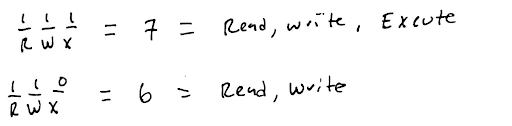
Now you may be asking yourself, what’s the point of binary besides passing your college course. A common example of binary is with flags, and in specific, Linux File Permission flags. They’re 3 bits and they represent R = read, W = write, and X = execute.

Below are a few examples of how to assign permissions via binary and their decimal value. It’s a cool way to use binary and basically treat each slot (bit) as a flag for a certain function or permission.
This is just a slight primer into the world of binary. There’s a lot of cool things you can understand with binary, primarily with how computers actually work. If that interests you, look up gates and adders and how they operate. Anyway, I hope you learned something from this article and continue to pursue programming knowledge!

 Happy Snail Programming